 TS-AIoT
TS-LINK Release Notes
Version history of the desktop app. The latest version is shown at the top.
TS-LINK 업데이트 내역
데스크톱 앱의 버전별 변경 사항입니다. 최신 버전이 가장 위에 표시됩니다.
TS-LINK 更新履歴
デスクトップアプリのバージョン別変更点です。最新バージョンが上部に表示されます。
TS-LINK Versionshinweise
Versionsverlauf der Desktop-App. Die neueste Version wird oben angezeigt.
Notas de la versión de TS-LINK
Historial de versiones de la aplicación de escritorio. La versión más reciente se muestra en la parte superior.
Notes de version de TS-LINK
Historique des versions de l'application de bureau. La version la plus récente est affichée en haut.
Note di rilascio di TS-LINK
Cronologia delle versioni dell'app desktop. La versione più recente è mostrata in alto.
v1.3.6
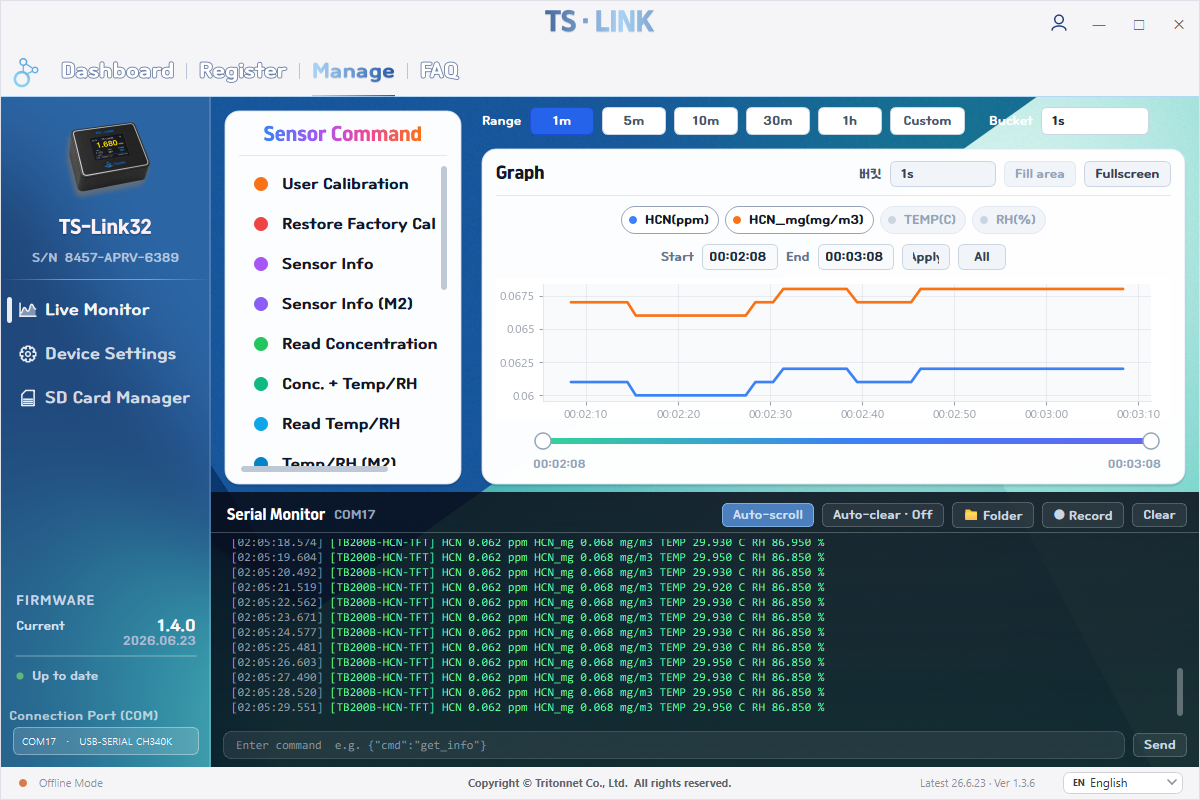
Latest2026.06.23- Sensor Command panel — automatically lists the datasheet commands for the connected sensor (TGSM, TB200B, TB600B); each opens a modal with a full explanation and example input
- Gas calibration built in — zero/span (TGSM) and gas-concentration / factory-restore (TB), with clear pink-caution and red-warning styling
- Readable responses — raw hex replies are decoded into values (gas type, concentration, temperature/humidity, version)
- Sensor Command 패널 — 연결된 센서에 맞춰 데이터시트 명령을 자동 표시(TGSM·TB200B·TB600B), 클릭하면 완벽한 설명과 예시 입력이 있는 모달
- 가스 교정 내장 — 제로/스팬(TGSM), 가스 농도 교정·공장 교정 복원(TB)을 핑크 주의·빨강 경고 표시와 함께 제공
- 응답 해석 — hex 원본 응답을 가스 종류·농도·온습도·버전 등 읽을 수 있는 값으로 변환
- Sensor Command パネル — 接続中のセンサーに応じてデータシートのコマンドを自動表示(TGSM・TB200B・TB600B)。クリックで詳しい説明と入力例のモーダルを表示
- ガス校正を内蔵 — ゼロ/スパン(TGSM)、ガス濃度校正・工場校正に戻す(TB)を、ピンクの注意・赤の警告表示とともに提供
- 応答の解読 — hexの生応答をガス種別・濃度・温湿度・バージョンなど読める値に変換
- Sensor-Command-Panel — listet automatisch die Datenblatt-Befehle des verbundenen Sensors (TGSM, TB200B, TB600B); jeder öffnet einen Dialog mit ausführlicher Erklärung und Eingabebeispiel
- Gaskalibrierung integriert — Null/Span (TGSM) sowie Gaskonzentration / Werksrücksetzung (TB), mit deutlicher rosa Vorsicht- und roter Warnkennzeichnung
- Lesbare Antworten — rohe Hex-Antworten werden in Werte übersetzt (Gastyp, Konzentration, Temperatur/Feuchte, Version)
- Panel Sensor Command — lista automáticamente los comandos de la hoja de datos del sensor conectado (TGSM, TB200B, TB600B); cada uno abre un modal con explicación completa y ejemplo de entrada
- Calibración de gas integrada — cero/span (TGSM) y concentración de gas / restauración de fábrica (TB), con clara indicación rosa de precaución y roja de advertencia
- Respuestas legibles — las respuestas hex se decodifican en valores (tipo de gas, concentración, temperatura/humedad, versión)
- Panneau Sensor Command — liste automatiquement les commandes de la fiche technique du capteur connecté (TGSM, TB200B, TB600B) ; chacune ouvre une fenêtre avec explication complète et exemple de saisie
- Étalonnage gaz intégré — zéro/span (TGSM) et concentration de gaz / restauration usine (TB), avec un repère rose d'attention et rouge d'avertissement clairs
- Réponses lisibles — les réponses hex brutes sont décodées en valeurs (type de gaz, concentration, température/humidité, version)
- Pannello Sensor Command — elenca automaticamente i comandi da datasheet del sensore collegato (TGSM, TB200B, TB600B); ognuno apre un modale con spiegazione completa ed esempio di input
- Calibrazione gas integrata — zero/span (TGSM) e concentrazione gas / ripristino di fabbrica (TB), con chiara indicazione rosa di attenzione e rossa di avviso
- Risposte leggibili — le risposte hex grezze vengono decodificate in valori (tipo di gas, concentrazione, temperatura/umidità, versione)
v1.3.5
2026.06.19- Smarter firmware matching — picks the right build even without a sensor (device info + display flag) and never guesses the display type; older devices get a pastel-pink model picker
- Polished loading overlays — refined SD / real-time loading animations and battery time & charge display
- 더 똑똑한 펌웨어 매칭 — 센서 없이도 올바른 빌드 선택(기기 정보+디스플레이 플래그), 디스플레이 유무를 추측하지 않음. 구형 기기는 파스텔 핑크 모델 선택 단계 제공
- 로딩 오버레이 다듬기 — SD·실시간 로딩 애니메이션과 배터리 잔량·충전 표시 보정
- より賢いファームウェアマッチング — センサーなしでも正しいビルドを選択(デバイス情報+ディスプレイフラグ)。ディスプレイ有無を推測せず、旧機種にはパステルピンクのモデル選択を提供
- ローディング表示の調整 — SD・リアルタイムのローディングアニメーションとバッテリー残量・充電表示を改善
- Intelligenteres Firmware-Matching — wählt den richtigen Build auch ohne Sensor (Geräteinfo + Display-Flag) und rät nie den Display-Typ; ältere Geräte erhalten eine pastellrosa Modellauswahl
- Verfeinerte Ladeoverlays — überarbeitete SD-/Echtzeit-Ladeanimationen sowie Batterielaufzeit- und Ladeanzeige
- Coincidencia de firmware más inteligente — elige la compilación correcta incluso sin sensor (info del dispositivo + indicador de pantalla) y nunca adivina el tipo de pantalla; los equipos antiguos tienen un selector de modelo rosa pastel
- Superposiciones de carga pulidas — animaciones de carga de SD / tiempo real y visualización de batería y carga mejoradas
- Correspondance firmware plus intelligente — choisit le bon build même sans capteur (infos appareil + indicateur d'écran) et ne devine jamais le type d'écran ; les anciens appareils ont un sélecteur de modèle rose pastel
- Surcouches de chargement affinées — animations de chargement SD / temps réel et affichage de l'autonomie et de la charge de la batterie
- Abbinamento firmware più intelligente — sceglie la build corretta anche senza sensore (info dispositivo + flag display) e non indovina mai il tipo di display; i dispositivi più vecchi hanno un selettore modello rosa pastello
- Overlay di caricamento rifiniti — animazioni di caricamento SD / tempo reale e visualizzazione di autonomia e carica della batteria
v1.3.4
2026.06.18- Reliable large SD-list loading — an idle-based timeout handles 16 GB cards without failing
- Smoother COM-port handoff — between SD manager and real-time monitoring; fixed a freeze after cancelling a firmware update
- 대용량 SD 목록 로딩 안정화 — 무응답 기반 타임아웃으로 16GB 카드도 실패 없이 처리
- COM 포트 전환 매끄럽게 — SD 매니저 ↔ 실시간 모니터링 전환 개선, 펌웨어 업데이트 취소 후 멈춤 수정
- 大容量SD一覧の読み込み安定化 — 無応答ベースのタイムアウトで16GBカードも失敗なく処理
- COMポート切り替えを円滑化 — SDマネージャー⇔リアルタイム監視の切り替えを改善し、ファーム更新キャンセル後の停止を修正
- Zuverlässiges Laden großer SD-Listen — ein Leerlauf-Timeout bewältigt 16-GB-Karten ohne Fehler
- Sanftere COM-Port-Übergabe — zwischen SD-Manager und Echtzeit-Überwachung; behebt ein Einfrieren nach Abbruch eines Firmware-Updates
- Carga fiable de listas SD grandes — un tiempo de espera basado en inactividad maneja tarjetas de 16 GB sin fallar
- Traspaso de puerto COM más suave — entre el gestor SD y la monitorización en tiempo real; corregido un bloqueo tras cancelar una actualización de firmware
- Chargement fiable des grandes listes SD — un délai basé sur l'inactivité gère les cartes de 16 Go sans échec
- Transfert de port COM plus fluide — entre le gestionnaire SD et la surveillance en temps réel ; correction d'un blocage après l'annulation d'une mise à jour du firmware
- Caricamento affidabile di liste SD grandi — un timeout basato sull'inattività gestisce schede da 16 GB senza errori
- Passaggio della porta COM più fluido — tra gestore SD e monitoraggio in tempo reale; corretto un blocco dopo l'annullamento di un aggiornamento firmware
v1.3.3
2026.06.15- Firmware update matching fixed — finds the correct firmware even without a sensor connected (identifies by device info, with metadata fallback)
- More reliable auto-update — delivers every file completely (images, flashing tools); resolves stale assets and firmware-apply failures on customer PCs
- 펌웨어 업데이트 매칭 수정 — 센서를 연결하지 않아도 기기 정보로 올바른 펌웨어를 찾고, 메타데이터 폴백 지원
- 자동 업데이트 안정화 — 이미지·플래싱 도구 등 모든 파일을 온전히 전달, 고객 PC의 누락 파일·펌웨어 적용 실패 해결
- ファームウェア更新のマッチングを修正 — センサー未接続でもデバイス情報から正しいファームウェアを特定(メタデータによるフォールバック対応)
- 自動アップデートの安定化 — 画像や書き込みツールなど全ファイルを完全に配信し、顧客PCでのファイル欠落・書き込み失敗を解消
- Firmware-Update-Zuordnung korrigiert — findet die richtige Firmware auch ohne angeschlossenen Sensor (Identifikation über Geräteinfos, mit Metadaten-Fallback)
- Zuverlässigeres Auto-Update — vollständige Auslieferung aller Dateien (Bilder, Flash-Tools); behebt veraltete Dateien und Flash-Fehler auf Kunden-PCs
- Coincidencia de actualización de firmware corregida — encuentra el firmware correcto incluso sin un sensor conectado (identifica por información del dispositivo, con respaldo por metadatos)
- Actualización automática más fiable — entrega todos los archivos por completo (imágenes, herramientas de grabación); soluciona archivos obsoletos y fallos al aplicar firmware en PC de clientes
- Correspondance de mise à jour du firmware corrigée — trouve le bon firmware même sans capteur connecté (identification par les infos de l'appareil, avec repli sur les métadonnées)
- Mise à jour automatique plus fiable — livraison complète de tous les fichiers (images, outils de flashage) ; corrige les fichiers obsolètes et les échecs d'application du firmware sur les PC clients
- Corretta corrispondenza dell'aggiornamento firmware — trova il firmware corretto anche senza sensore collegato (identificazione dalle informazioni del dispositivo, con fallback sui metadati)
- Aggiornamento automatico più affidabile — consegna completa di tutti i file (immagini, strumenti di flashing); risolve file obsoleti e fallimenti nell'applicazione del firmware sui PC dei clienti
v1.3.2
2026.06.13- Firmware update modal redesigned — premium staged animations (flowing gradient %, aurora and particle visuals) with a wider, cleaner layout
- 펌웨어 업데이트 모달 리디자인 — 단계별 프리미엄 애니메이션(흐르는 그라데이션 %, 오로라·파티클 비주얼)과 더 넓고 깔끔한 레이아웃
- ファームウェア更新モーダルを再デザイン — 段階ごとのプレミアムアニメーション(流れるグラデーション%、オーロラ・パーティクル表現)と、より広く洗練されたレイアウト
- Firmware-Update-Dialog neu gestaltet — hochwertige Animationen je Phase (fließendes Gradient-%, Aurora- und Partikel-Effekte) und ein breiteres, aufgeräumtes Layout
- Modal de actualización de firmware rediseñado — animaciones premium por etapas (% con degradado en movimiento, efectos de aurora y partículas) y un diseño más amplio y limpio
- Fenêtre de mise à jour du firmware repensée — animations premium par étape (% en dégradé animé, effets d'aurore et de particules) et une mise en page plus large et épurée
- Finestra di aggiornamento firmware ridisegnata — animazioni premium per fase (% con gradiente in movimento, effetti aurora e particelle) e un layout più ampio e pulito
v1.3.1
2026.06.12- Update flow polish — fixed the firmware widget showing “update” at equal versions; friendlier staged messages and smoother transitions
- 업데이트 흐름 다듬기 — 버전이 같은데도 ‘업데이트’로 뜨던 위젯 수정, 단계별 안내 문구와 전환 애니메이션 개선
- アップデート手順の調整 — 同一バージョンでも「更新」と表示されていたウィジェットを修正、段階メッセージと遷移アニメーションを改善
- Feinschliff am Update-Ablauf — Korrektur des Firmware-Widgets, das bei gleicher Version „Update“ anzeigte; freundlichere Phasen-Meldungen und sanftere Übergänge
- Pulido del flujo de actualización — corregido el widget que mostraba “actualizar” con versiones iguales; mensajes por etapas más amables y transiciones más suaves
- Peaufinage du flux de mise à jour — correction du widget affichant « mise à jour » à versions égales ; messages par étape plus clairs et transitions plus fluides
- Rifinitura del flusso di aggiornamento — corretto il widget che mostrava “aggiorna” a parità di versione; messaggi per fase più chiari e transizioni più fluide
v1.3.0
2026.06.10- Firmware update over COM port — download → integrity check → flash → reboot verify, with automatic COM handoff
- Sidebar firmware widget — compares the device version against the server and shows update availability live
- COM 포트 펌웨어 업데이트 — 다운로드 → 무결성 검증 → 플래싱 → 재부팅 확인, COM 포트 자동 핸드오프
- 사이드바 펌웨어 위젯 — 기기 버전과 서버 버전을 비교해 업데이트 여부를 실시간 표시
- COMポート経由のファームウェア更新 — ダウンロード → 整合性チェック → 書き込み → 再起動確認、COMポートの自動切り替え
- サイドバーのファームウェアウィジェット — デバイスとサーバーのバージョンを比較し、更新の有無をリアルタイム表示
- Firmware-Update über COM-Port — Download → Integritätsprüfung → Flashen → Neustart-Verifizierung, mit automatischer COM-Übergabe
- Firmware-Widget in der Seitenleiste — vergleicht die Geräteversion mit dem Server und zeigt die Update-Verfügbarkeit live an
- Actualización de firmware por puerto COM — descarga → verificación de integridad → grabación → verificación tras reinicio, con traspaso automático del COM
- Widget de firmware en la barra lateral — compara la versión del dispositivo con el servidor y muestra la disponibilidad de actualización en vivo
- Mise à jour du firmware via le port COM — téléchargement → vérification d'intégrité → flashage → vérification au redémarrage, avec transfert automatique du COM
- Widget de firmware dans la barre latérale — compare la version de l'appareil au serveur et indique la disponibilité d'une mise à jour en direct
- Aggiornamento firmware via porta COM — download → verifica integrità → flashing → verifica al riavvio, con passaggio automatico della COM
- Widget firmware nella barra laterale — confronta la versione del dispositivo con il server e mostra la disponibilità di aggiornamenti in tempo reale
v1.2.0
2026.06.05- SD card manager — format and selectively delete CSVs in-app (no need to remove the card), loading animation, and large-CSV (300+) optimization
- SD카드 매니저 — 카드를 빼지 않고 앱에서 포맷·선택 삭제, 로딩 애니메이션, 대용량 CSV(300개+) 최적화
- SDカードマネージャー — カードを取り出さずにアプリ内でフォーマット・選択削除、ローディングアニメーション、大量CSV(300件以上)の最適化
- SD-Karten-Manager — Formatieren und gezieltes Löschen von CSVs in der App (ohne Kartenentnahme), Ladeanimation und Optimierung für große CSV-Mengen (300+)
- Gestor de tarjeta SD — formatear y eliminar CSV de forma selectiva desde la app (sin sacar la tarjeta), animación de carga y optimización para muchos CSV (más de 300)
- Gestionnaire de carte SD — formater et supprimer des CSV de manière sélective dans l'app (sans retirer la carte), animation de chargement et optimisation pour de nombreux CSV (300+)
- Gestore della scheda SD — formattazione ed eliminazione selettiva dei CSV nell'app (senza rimuovere la scheda), animazione di caricamento e ottimizzazione per molti CSV (oltre 300)
v1.1.0
2026.05.29- Real-time monitoring page — live sensor graph with parameter toggles, time-range presets, bucket sampling, area fill, and fullscreen
- Footer serial monitor — COM-port live log with record/clear and a command input box
- 실시간 모니터링 페이지 — 파라미터 토글·시간 범위·버킷 샘플링·영역 채우기·전체화면을 갖춘 실시간 그래프
- 하단 시리얼 모니터 — COM 포트 실시간 로그, 녹화/지우기, 명령어 입력창
- リアルタイム監視ページ — パラメータ切替・時間範囲・バケットサンプリング・領域塗りつぶし・全画面に対応したリアルタイムグラフ
- フッターのシリアルモニター — COMポートのリアルタイムログ、記録/クリア、コマンド入力欄
- Echtzeit-Überwachungsseite — Live-Sensorgraph mit Parameter-Umschaltern, Zeitbereich-Voreinstellungen, Bucket-Sampling, Flächenfüllung und Vollbild
- Serieller Monitor in der Fußzeile — COM-Port-Live-Log mit Aufnehmen/Löschen und einem Befehls-Eingabefeld
- Página de monitorización en tiempo real — gráfico de sensor en vivo con conmutadores de parámetros, rangos de tiempo, muestreo por bloques, relleno de área y pantalla completa
- Monitor serie en el pie — registro en vivo del puerto COM con grabar/borrar y un cuadro de entrada de comandos
- Page de surveillance en temps réel — graphique de capteur en direct avec bascules de paramètres, plages de temps, échantillonnage par blocs, remplissage de zone et plein écran
- Moniteur série en pied de page — journal en direct du port COM avec enregistrer/effacer et un champ de saisie de commande
- Pagina di monitoraggio in tempo reale — grafico del sensore dal vivo con interruttori dei parametri, intervalli di tempo, campionamento a bucket, riempimento d'area e schermo intero
- Monitor seriale nel piè di pagina — log in tempo reale della porta COM con registra/cancella e un campo di immissione comandi
v1.0.0
2026.05.18- Device identification over COM port, Wi-Fi setup, and product registration
- TS-AIoT account & dashboard integration, and app auto-update
- 7-language support (EN · KO · JA · DE · ES · FR · IT)
- COM 포트 기기 식별, Wi-Fi 설정, 제품 등록
- TS-AIoT 계정·대시보드 연동, 앱 자동 업데이트
- 7개 국어 지원 (영 · 한 · 일 · 독 · 스 · 프 · 이)
- COMポートによるデバイス識別、Wi-Fi設定、製品登録
- TS-AIoTアカウント・ダッシュボード連携、アプリの自動アップデート
- 7言語対応(英・韓・日・独・西・仏・伊)
- Geräteerkennung über COM-Port, WLAN-Einrichtung und Produktregistrierung
- TS-AIoT-Konto- und Dashboard-Integration sowie App-Auto-Update
- Unterstützung für 7 Sprachen (EN · KO · JA · DE · ES · FR · IT)
- Identificación del dispositivo por puerto COM, configuración Wi-Fi y registro de producto
- Integración con cuenta y panel de TS-AIoT, y actualización automática de la app
- Compatibilidad con 7 idiomas (EN · KO · JA · DE · ES · FR · IT)
- Identification de l'appareil via le port COM, configuration Wi-Fi et enregistrement du produit
- Intégration au compte et au tableau de bord TS-AIoT, et mise à jour automatique de l'application
- Prise en charge de 7 langues (EN · KO · JA · DE · ES · FR · IT)
- Identificazione del dispositivo via porta COM, configurazione Wi-Fi e registrazione del prodotto
- Integrazione con account e dashboard TS-AIoT e aggiornamento automatico dell'app
- Supporto per 7 lingue (EN · KO · JA · DE · ES · FR · IT)